10+ Free React Admin Dashboard Templates for 2026

Vaibhav Gupta
Mar 11, 2026
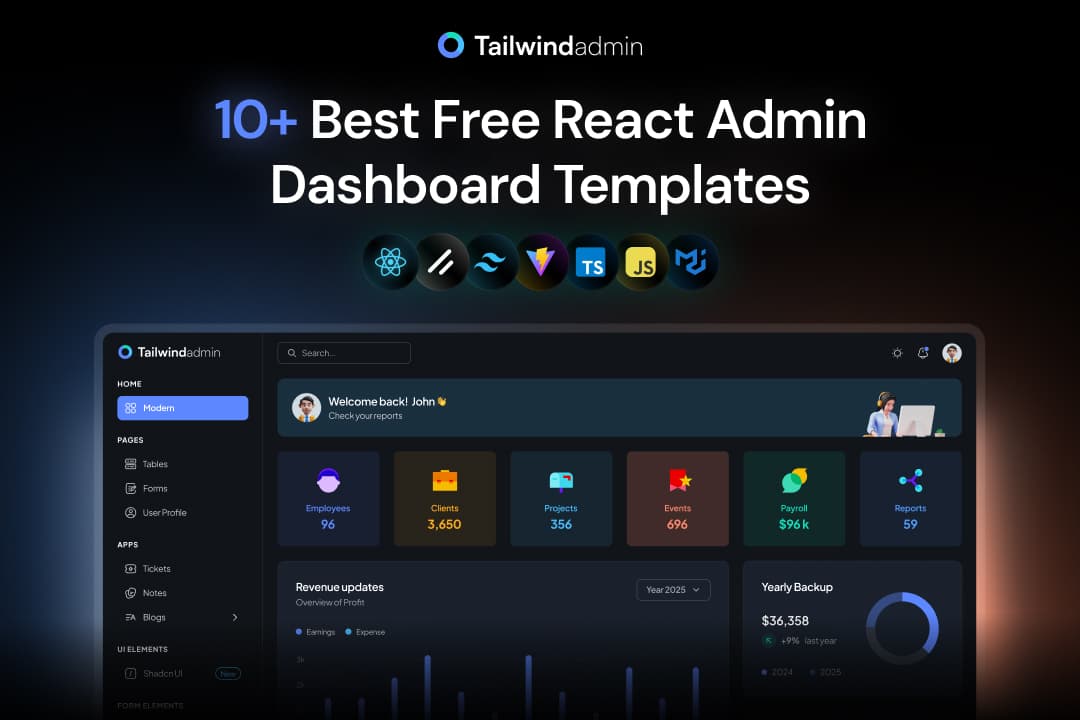
React remains the most widely used frontend framework for building SaaS dashboards, internal tools, and analytics platforms across US startups and enterprise teams. However, choosing a free React admin template can be risky if it lacks structure, active maintenance, or real-world usability.
This blog lists free React admin dashboards that developers actually use, not just visually polished demos.
Each template in this list is evaluated based on code quality, stack relevance, layout scalability, and real-world project readiness, using public demos, GitHub repositories, and observable developer adoption patterns.
In this guide, you’ll learn which free React admin dashboards are reliable for production use, the tech stack each one uses, and which use cases they fit best - such as SaaS analytics, internal tools, or full-stack applications.
You’ll also understand how many layouts, components, and pages each template provides, so you can pick faster without trial and error.
Quality Factors Used to Evaluate These React Dashboards
Before listing the templates, we filtered and reviewed each one using practical engineering criteria. These factors reflect what US-based product teams and individual developers usually care about when choosing a free React admin dashboard for real projects.
| Quality Factor | Why it Matters for Developers |
|---|---|
| React Version Support | Templates should support React v18+ to avoid upgrade friction and deprecated patterns |
| Layout Architecture | Clear separation of sidebar, header, and content areas makes scaling easier |
| Component Reusability | Reusable cards, tables, and forms reduce rewrite time |
| Routing Structure | Predictable route setup helps when adding new modules or roles |
| Styling Approach | Tailwind or MUI should be consistently applied without mixed patterns |
| Chart Integration | Dashboards must support charts that can bind to real API data |
| Code Readability | A clean folder structure and naming reduces onboarding time |
| Maintenance Status | Recently updated repos lower long-term risk |
| Production Readiness | Suitable for internal tools, SaaS dashboards, or admin panels |
| US Team Usage Fit | Works well for SaaS, startups, and internal systems common in the US markets |
Why this matters:
Templates that fail on even 2–3 of these points often require more time to fix than building from scratch.
Quick Comparison of React Admin Dashboards
Before diving into the details, here’s a quick overview of the top React admin dashboard templates, their tech stacks, and ideal use cases.
| Template | Tech Stack | GitHub Stars | Last Updated | Best For |
|---|---|---|---|---|
| Tailwindadmin | React v19, Tailwind CSS v4, Shadcn, TypeScript | 195 | Feb 2026 | SaaS analytics dashboards and internal admin tools |
| MaterialM | React v19, Tailwind CSS v4, ApexChart, TypeScript | 5 | Feb 2025 | Lightweight SaaS dashboards using Tailwind |
| Modernize | React v19, Material UI v7, JavaScript | 29 | May 2025 | Clean admin dashboards using Material UI |
| Spike | React v19, Tailwind CSS v4, Flowbite, TypeScript | 3 | June 2025 | Modern admin UIs with Tailwind |
| MatDash | React v19, Tailwind CSS v4, Vite, TypeScript | 7 | Feb 2025 | Simple analytics dashboards with Tailwind |
| MaterialPRO | React v19, Material UI v7, Vite, TypeScript | 25 | May 2025 | Data-driven admin dashboards |
| Sakai | React v18, PrimeReact v10, PrimeFlex, TypeScript | 998 | 2023 | Enterprise dashboards with complex UI needs |
| NextKit | Next.js v15, React v19, Tailwind CSS v4, Supabase, Prisma, MongoDB | 20 | June 2025 | Full-stack dashboards with authentication |
| Material Dashboard | React v18, Material UI v6, ChromaJS, React ChartJS 2 | 3K+ | 2023 | Product dashboards following Material Design |
| DeviasKit | React v16, Material UI v7, Next.js v14, ApexCharts | 5.6K+ | June 2025 | Scalable SaaS back-office dashboards |
Best Free React Admin Dashboard Templates
The templates below are free to use, publicly accessible, and suitable for real projects. Each one is listed with a clear use case, verified tech stack, and feature breakdown so you can decide quickly without cloning multiple repos.
Tailwindadmin
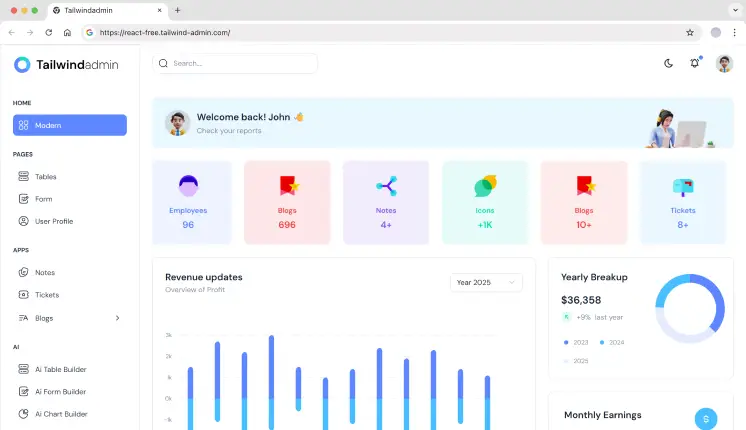
Tailwindadmin provides a React admin dashboard built with Tailwind CSS and a clear layout system. It includes a sidebar-based dashboard, reusable UI components, and prebuilt pages like tables, forms, and authentication. The structure is designed for extending dashboards with analytics and internal tools. Styling is handled entirely through Tailwind utility classes, without additional custom CSS layers.
Tech stack: React v19, Tailwind CSS v4, Shadcn, TypeScript
GitHub Stars: 195
Last Updated: Feb 2026
Key features:
- Single dashboard layout with sidebar + header architecture
- 10+ reusable UI components
- 5+ pages including dashboard, tables, forms, and auth
- 3+ Pre-configured chart components
- Dark & Light Mode Support
Best for: SaaS analytics dashboards and internal admin tools
MaterialM
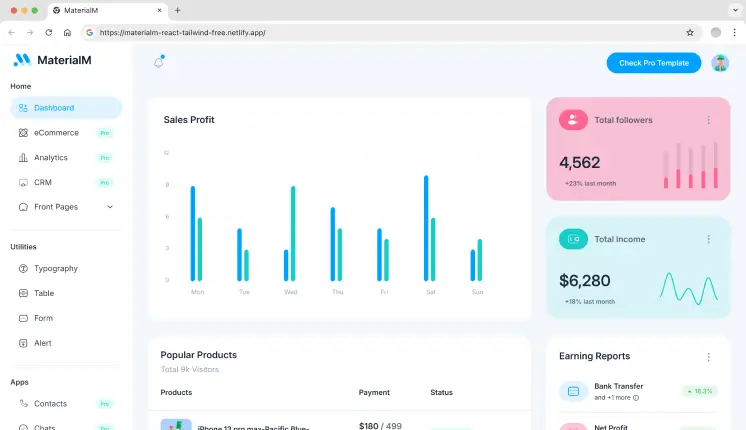
MaterialM combines Material-style layouts with Tailwind utilities, giving developers control without heavy abstraction. It’s suitable for early-stage SaaS products and MVP dashboards. The structure stays minimal and readable.
Tech stack: React v19, Tailwind CSS v4, ApexChart, TypeScript
GitHub Stars: 5
Last Updated: Feb 2025
Key features:
- Single dashboard layout
- 5+ UI components & 4+ Bundled Plugins
- Core admin pages (tables, forms, auth)
- Utility-first styling without MUI dependency
- Well Documented & Proper File Naming
Best for: Lightweight SaaS dashboards using Tailwind
Modernize
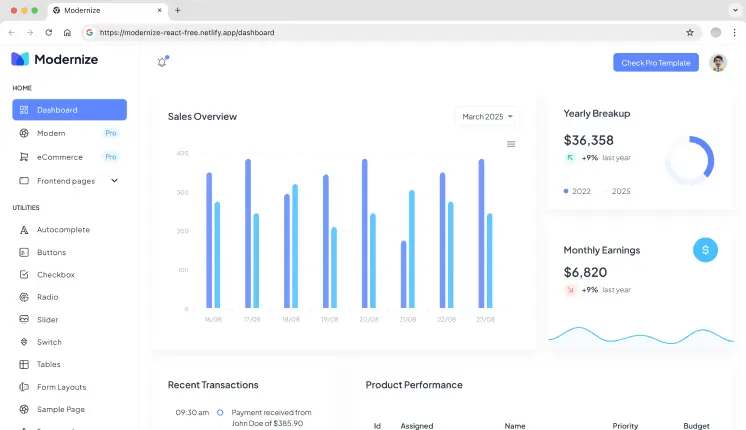
Modernize offers a React admin template built with Material UI and a clean layout system. It includes dashboard pages, charts, UI components, and basic navigation. The design focuses on clarity and reusable components. It is suitable for admin panels and reporting dashboards.
GitHub Stars: 29
Tech stack: React v19, Material UI v7, JavaScript
Last Updated: May 2025
Key features:
- Single dashboard layout(Focused on Analytical)
- 10+ UI components for dashboard layout
- 5+ Pre-Built Pages (like Icons, Sample, Auth Pages, etc.)
- Easy theme customization
- React Table Examples
Best for: Clean admin dashboards using Material UI
Spike
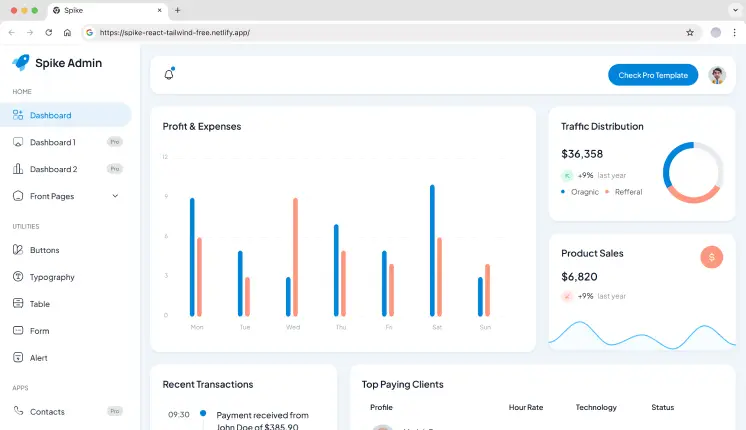
Spike is a Tailwind CSS-based React admin dashboard with a clean and minimal layout. It includes a dashboard page, reusable components, navigation, and chart areas. The component structure is straightforward for extending pages and features. Styling relies fully on Tailwind utilities.
GitHub Stars: 3
Tech stack: React v19, Tailwind CSS v4, Flowbite, TypeScript
Last Updated: June 2025
Key features:
- Single dashboard layout
- 5+ reusable components & 7+ Pre-Built Page Templates
- Clean sidebar and navigation logic
- Fast local development setup
- Well-explained Documentation
Best for: Modern admin UIs with Tailwind
MatDash
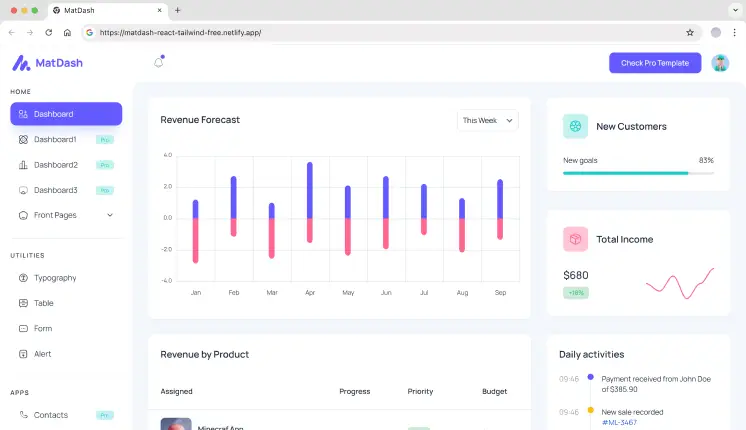
MatDash is built with Tailwind CSS and React, providing a simple layout structure. It includes a dashboard view, core UI components, and chart sections. The codebase keeps components lightweight and easy to extend. It is designed for internal dashboards and monitoring tools.
GitHub Stars: 7
Tech stack: React v19, Tailwind CSS v4, Vite, TypeScript
Last Updated: Feb 2025
Key features:
- Single dashboard layout
- 5+ UI components for dashboard layout
- 5+ Pre-Built Pages (like Icons, Sample, Auth Pages, etc.)
- Basic Customization Options
- Well-explained Folder Structure in Documentation
Best for: Simple analytics dashboards with Tailwind
MaterialPRO
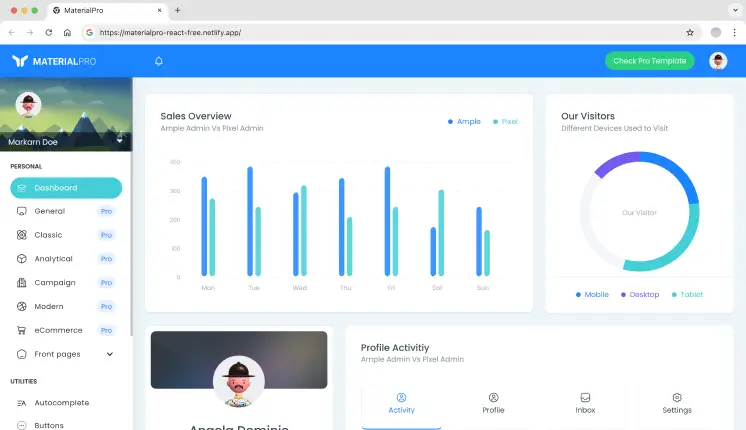
MaterialPRO provides a React dashboard focused on widgets, metrics, and chart sections. It includes a structured dashboard layout, UI widgets, and data visualization components. Pages are organized for analytics and reporting use cases. The template follows Material UI theming conventions.
Tech stack: React v19, Material UI v7, Vite, TypeScript
GitHub Stars: 25
Last Updated: May 2025
Key features:
- Single dashboard layout
- 10+ UI components for dashboard layout
- 7+ Pre-Built Page Templates & 10+ Bundled Plugins
- Modular page grouping
- Community Support Included
Best for: Data-driven admin dashboards
Sakai
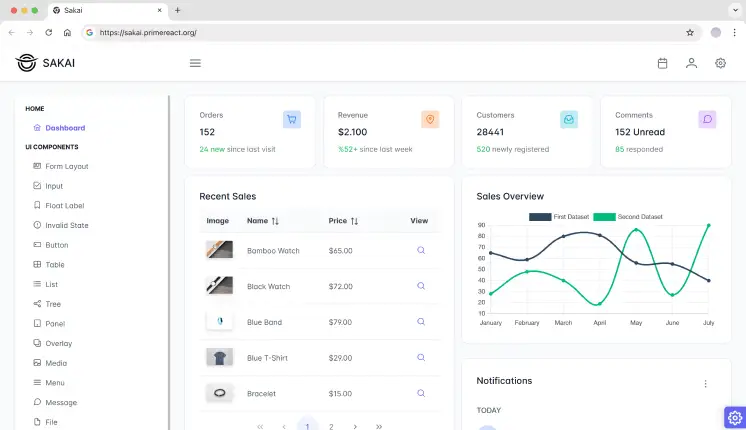
Sakai is a React admin dashboard built using PrimeReact components and PrimeFlex layout utilities. It includes a dashboard layout, advanced data tables, form controls, and chart components. The template supports multiple layout patterns and theme options. It is designed for UI-heavy admin and enterprise dashboards.
Tech stack: React v18, PrimeReact v10, PrimeFlex, TypeScript
GitHub Stars: 998
Last Updated: 2023
Key features:
- Single dashboard layout
- 15+ PrimeReact components
- 6+ Pre-Built Pages (like CRUD, 404, Empty, Auth Pages, etc.)
- Ripple Effect supported
- Built-in theme switching
Best for: Enterprise dashboards with complex UI needs
NextKit
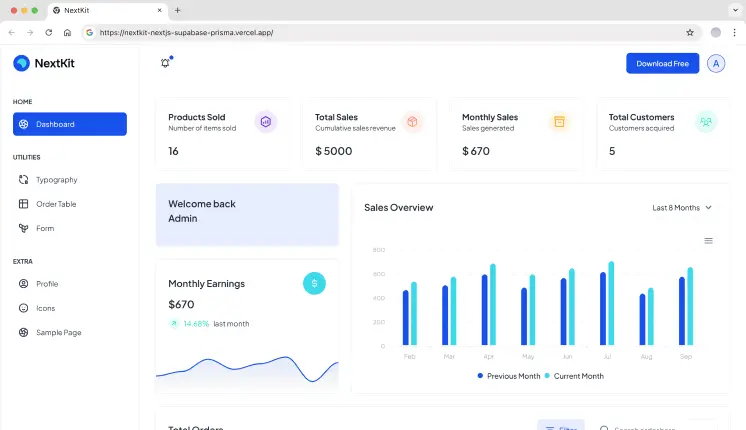
NextKit provides an admin dashboard built with Next.js and React, designed for authenticated applications. It includes a dashboard layout, authentication flow, and database-connected examples. The project structure supports server-side rendering and API routes. It is intended for full-stack admin and internal tools.
Tech stack: Next.js v15, React v19, Tailwind CSS v4, Supabase, Prisma, MongoDB
GitHub Stars: 20
Last Updated: June 2025
Key features:
- Single Admin layout with auth-ready structure
- Database-connected examples
- Server-side rendering support
- API-friendly architecture
- Ideal for managing non-relational, schema-less data with agility
Best for: Full-stack dashboards with authentication
Material Dashboard
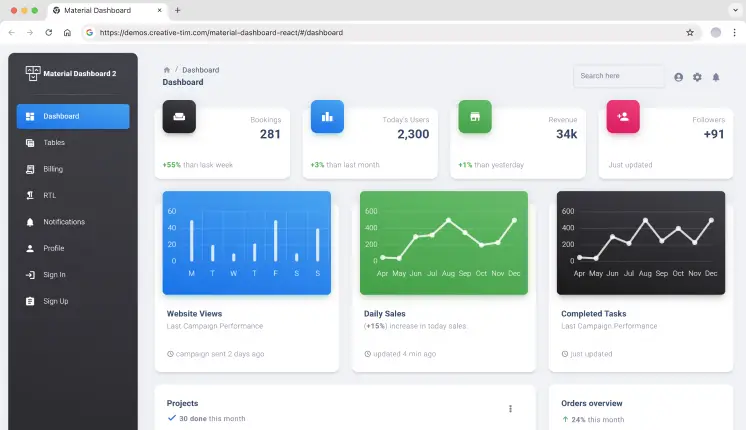
Material Dashboard React offers a React admin interface based on Material UI components. It includes a dashboard layout, chart sections, tables, typography pages, and icon examples. The theme configuration follows Material Design standards for spacing and color. Components are structured for reuse across admin pages.
Tech stack: React v18, Material UI v6, ChromaJS, React ChartJS 2
GitHub Stars: 3K+
Last Updated: 2023
Key features:
- Single dashboard layout with RTL Support
- 70+ MUI components
- 6+ Pre-Built Pages (like Tables, Billing, Notifications, Profile Page, etc.)
- Centralized theme configuration
- Dark & Light Mode Support
Best for: Product dashboards following Material Design
DeviasKit
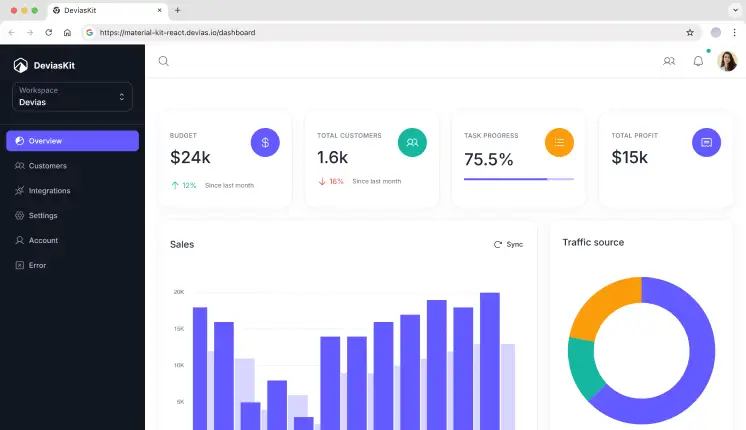
DeviasKit provides a React admin dashboard built on Material UI with a structured page layout. It includes dashboard views, authentication pages, charts, and table components. The folder structure separates layouts, pages, and UI elements for easier scaling. The setup is suitable for admin workflows and back-office dashboards.
Tech stack: React v16, Material UI v7, Next.js v14, ApexCharts
GitHub Stars: 5.6K+
Last Updated: June 2025
Key features:
- Single dashboard layout
- Schemas validated with Zod
- 8+ Pre-Built Pages (like Auth, dashboard, and data visualization pages, etc.)
- Free Figma Design System
- Forms built with React Hook Form
Best for: Scalable SaaS back-office dashboards
Frequently Asked Questions (FAQs)
1. Are these free React admin templates suitable for production use?
Yes. All listed templates are suitable for production use. They provide layout structure, UI components, and routing, but you’ll still need to add authentication logic, API integrations, and state management based on your app’s requirements.
2. What should I check before choosing a free React admin template?
Check React version support, routing structure, component reuse, chart integration, and recent maintenance activity. Templates that fail on these points often require refactoring as the project grows. Choose a dashboard that is actively maintained and aligns with your long-term product needs.
3. Which free React admin dashboard is best for building a SaaS analytics app?
If you’re building a SaaS analytics dashboard, look for templates with a clear widget layout, chart placeholders, and predictable routing. Dashboards like Tailwindadmin, MaterialM, and Modernize work well because they separate layout from content and allow easy API data binding.
Final Thoughts
These free React admin dashboards are practical starting points for US-based SaaS teams, startups, and internal engineering groups. Each template solves a specific problem - whether it’s analytics, enterprise UI, or full-stack dashboards. We prioritized templates that developers can realistically extend, refactor, and ship to production - not just preview in demos.
Choose based on stack alignment, layout clarity, and long-term maintainability, not visual polish alone.
Table of Content
- Quality Factors Used to Evaluate These React Dashboards
- Quick Comparison of React Admin Dashboards
- Best Free React Admin Dashboard Templates
- Tailwindadmin
- MaterialM
- Modernize
- Spike
- MatDash
- MaterialPRO
- Sakai
- NextKit
- Material Dashboard
- DeviasKit
- Frequently Asked Questions (FAQs)
- 1. Are these free React admin templates suitable for production use?
- 2. What should I check before choosing a free React admin template?
- 3. Which free React admin dashboard is best for building a SaaS analytics app?
- Final Thoughts
Share